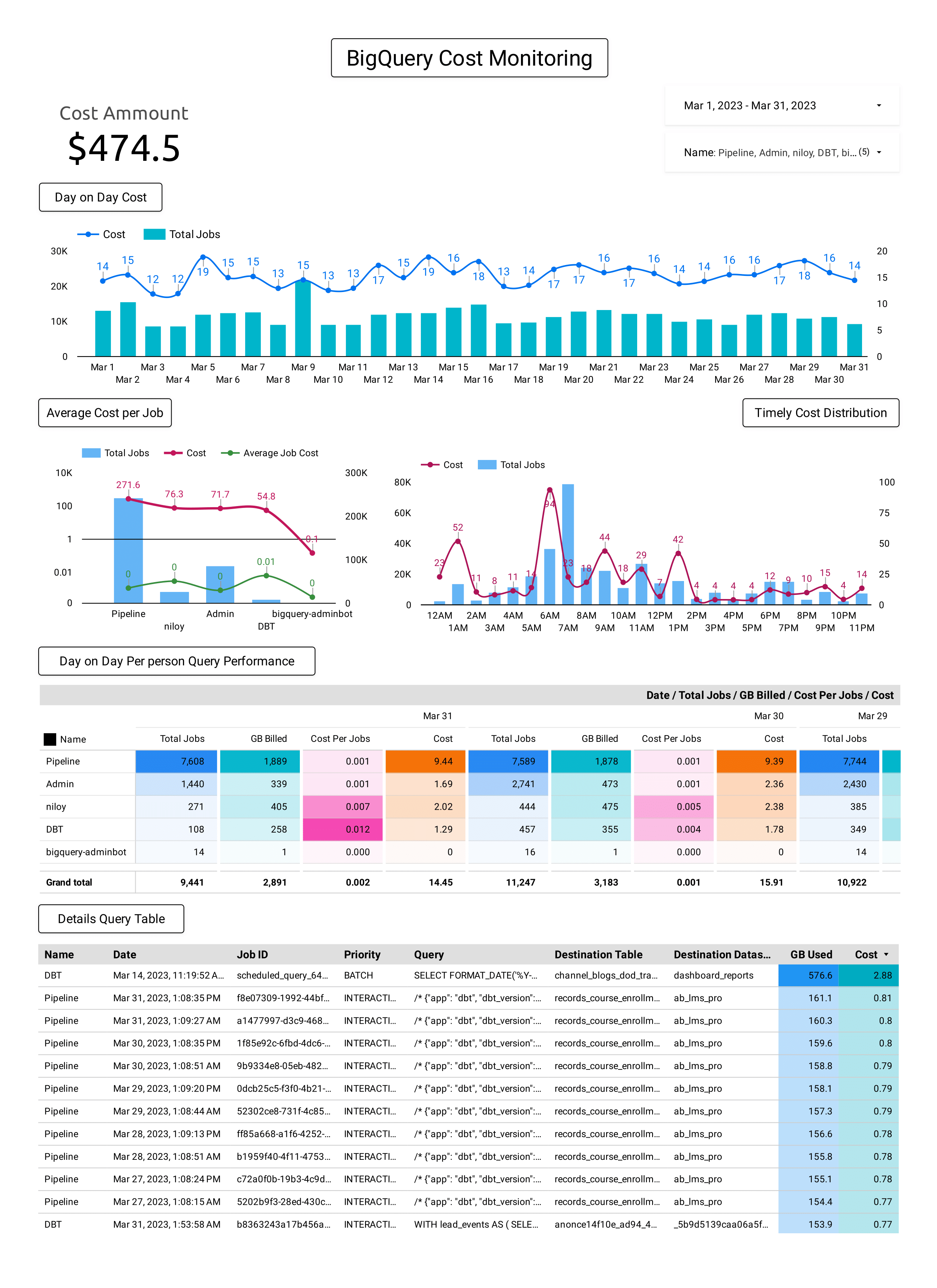
The 10 Minute School data team's BigQuery spend had grown to the point where we needed to see which query, dashboard or connector was responsible. This project reads region-us.INFORMATION_SCHEMA.JOBS, estimates the cost of every job and attributes it to the person, the Connected Sheets connector or the Data Studio (formerly Looker Studio) report behind it. The whole data team reviews the dashboard every week and optimizes queries when something stands out.
User, requestor or Connected Sheets connector label, Data Studio report, destination and referenced tables
Cost basis
total_bytes_billed at $6.25 per TiB on-demand, an estimate and not an invoice line
Review cadence
Weekly, by the whole data team
Stack
BigQuery SQL, Data Studio
The problem
On-demand BigQuery bills each query job for the bytes it processes, so a month of spend is the sum of thousands of small jobs. The bill shows totals by project and SKU. It does not say who ran a job, which report triggered it or which table it read. As our spend grew, the team needed exactly that: which query, which Data Studio report or which connector is responsible for the cost.
The query
INFORMATION_SCHEMA.JOBS holds running jobs plus job history for the past 180 days. It is queried one region at a time, and its data is partitioned by creation_time, so filtering on that column limits what the query scans. The query below returns one row per job.
SELECT
  JOBS.project_id,
  user_email,
  SPLIT(user_email, '@')[OFFSET(0)] Name,
  job_id,
  destination_table.dataset_id as destination_table_dataset_id,
  destination_table.table_id as destination_table_table_id,
  COALESCE((SELECT value FROM UNNEST(labels) WHERE key = 'requestor'), (SELECT value FROM UNNEST(labels) WHERE key = 'sheets_connector')) AS requestor,

  CONCAT("https://lookerstudio.google.com/u/0/reporting/", (SELECT value FROM UNNEST(labels) WHERE key = 'looker_studio_report_id')) Dashboard_Link,
  referenced_tables[SAFE_OFFSET(0)].dataset_id AS referenced_tables_dataset_id,
  referenced_tables[SAFE_OFFSET(0)].table_id AS referenced_tables_table_id,

  DateTime(creation_time) Date_Time,
  FORMAT_TIMESTAMP('%Y-%m-%d %I:%M %p', TIMESTAMP_ADD(creation_time, INTERVAL 6 HOUR)) AS dhaka_time,

  job_type,
  statement_type,
  priority,
  query,
  state,
  (total_bytes_processed / (1024 * 1024 * 1024)) Byte_Processed_GB,
  total_bytes_billed,
  total_bytes_billed / (1024 * 1024 * 1024) AS total_GB_billed,
  (total_bytes_billed / (1024 * 1024 * 1024 * 1024)) * 6.25 AS Cost_USD
FROM region-us.INFORMATION_SCHEMA.JOBS
WHERE
  Date(creation_time) >=
  DATE(FORMAT_DATE('%Y-%m-01', CURRENT_DATE() - 31)) -- Previous months starting
ORDER BY creation_time DESC
The columns group by the question they answer:
Who.user_email, a short Name taken from before the @, and requestor, which reads the job's requestor label and falls back to the sheets_connector label for Connected Sheets.
Which report.Dashboard_Link turns the looker_studio_report_id label into a clickable link to the Data Studio report that issued the job.
Which tables.destination_table_* is where results were written. referenced_tables_* is the first source table the job read.
When.Date_Time is UTC. dhaka_time adds 6 hours for Dhaka local time.
What kind of job.job_type, statement_type, priority, state and the query text.
How much.Byte_Processed_GB and total_GB_billed divide by 10243, so they are GiB despite the column names. Cost_USD divides billed bytes by 10244 to get TiB and multiplies by 6.25.
The WHERE clause keeps a rolling window that starts on the first day of the previous month, so the dashboard always has last month to compare against.
What changed from the first version
The original query is in the 2023 Medium post. It showed who ran a job and what it cost. This version was rewritten for more granular attribution:
Job labels attribute cost to the requester and to the exact Data Studio report, instead of only to a user account.
referenced_tables shows which source table a job read.
Dhaka time sits next to UTC, so hourly patterns read in local time.
Units are binary (GiB and TiB) and the rate is the current $6.25 per TiB on-demand, replacing the old flat $5 per decimal TB.
The window is rolling instead of a hard-coded start date.
Two practical notes if you adapt it. The estimate is gross: it does not subtract the free first 1 TiB per month, and it leaves out storage cost. If your workload uses scripts, add AND statement_type != 'SCRIPT' to the WHERE clause, because a script row includes summary values for its child jobs and summing both counts them twice.
The dashboard
The query is pasted as a custom query on the SQL tab of a BigQuery data source in Data Studio, and one dashboard sits on top of it. As the screenshot shows, it has a total cost scorecard with date and name filters, then:
Cost over time. Daily cost as a line over bars of job counts, to spot trends and spikes.
Cost by person. Total jobs, cost and average cost per job for each account, to find outliers.
Cost by hour. Jobs and cost across the day, to see when usage peaks.
Cost per job by date. A pivot of jobs, GB billed and cost for each person and day.
Detailed query table. Individual jobs sorted by cost, with the user, priority, query text and destination.
How the team uses it
Reviewing the dashboard is a weekly habit for the whole data team. We look for the jobs at the top of the cost table, check who or what issued them, and follow the Dashboard_Link when a Data Studio report is the source. When a query or a report is scanning more than it needs to, we optimize it.
Questions
How do I see which Data Studio report is driving BigQuery cost?
Jobs started by Data Studio carry a looker_studio_report_id label. Read it from the labels column of INFORMATION_SCHEMA.JOBS and append it to https://lookerstudio.google.com/u/0/reporting/, as the query above does, to get a link to the report. Sum the cost by that link to rank reports.
How do you calculate BigQuery query cost from INFORMATION_SCHEMA.JOBS?
Divide total_bytes_billed by 10244 to get TiB and multiply by your on-demand rate. Google's pricing page, checked in October 2026, lists $6.25 per TiB for Iowa (us-central1), and rates vary by region. total_bytes_billed is only meaningful for projects on on-demand pricing. For flat-rate projects Google documents it as informational.
Does INFORMATION_SCHEMA.JOBS cost include the free tier?
No. The first 1 TiB of query processing each month is free on on-demand pricing, but the query multiplies every billed byte by the rate. Subtract the free tier from the monthly total if you want a figure closer to the invoice.